What are Variants in Figma?

Learn how variants let you manage multiple component states in one organized set.
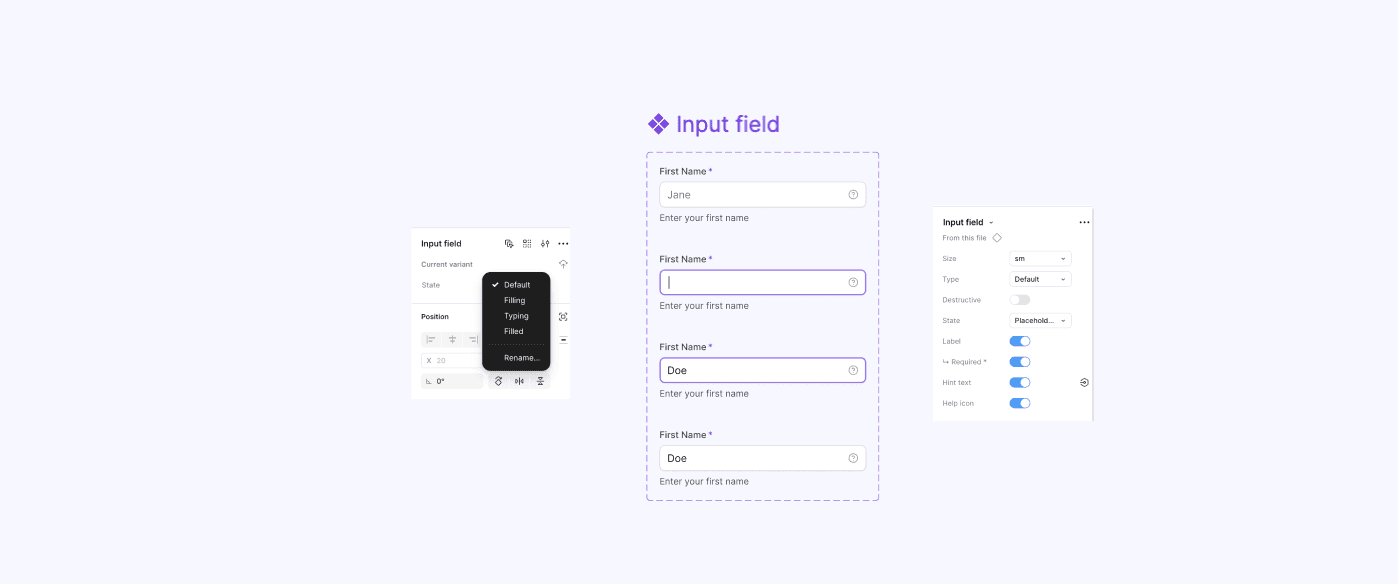
Overview

Variants in Figma let you group different versions of a component together in one place. Instead of creating separate components for every button style or state, you can keep them all inside a single “component set” and switch between them easily.

How it works

Think of a button: you might need primary, secondary, hover, pressed, and disabled styles. Without variants, you’d end up managing five separate components. With variants, all of those versions live inside one component set, and you can swap between them using simple properties like “Type” or “State.”

Variants make it easier to design consistently, reduce clutter in your libraries, and speed up prototyping. They also work beautifully with Auto Layout, Components, and Variables. Together, they give you the flexibility to build complex design systems that stay organized and easy to scale.

For example, clients often ask how to manage buttons in different states (default, hover, pressed, disabled) without clutter — variants keep all those states inside one neat component set.

Practical examples

  • Creating button sets with hover, pressed, and disabled states

  • Managing multiple card layouts (e.g., image card, text-only card, product card)

  • Designing form inputs that switch between filled, error, and success states

  • Building Design Systems that remain clean and easy to maintain

Recommended Courses

Recommended Courses

Recommended Courses

Recommended Courses

Practical Figma training for your own work: private lessons, individual bootcamp places, and separately quoted company workshops. Discuss the tools and learning goals before booking.

Private 1-on-1 Figma lessons

Individual bootcamp places

Team and corporate workshops

Figma AI, agent & Make workflows

Practical, hands-on exercises

Offers

Need Help Learning Figma Faster?

What would you like to learn next?

Discuss your goals in a free 15-minute call. Choose practical Figma training, AI coaching, an individual bootcamp place, or a workshop for your team.

Practical Figma and AI training for individuals and teams. Choose private coaching, or discuss a tailored bootcamp or company workshop.

Copyright 2026 — All rights reserved.

Design Tools Coach is an independent training service, not affiliated with, sponsored by, or endorsed by Figma, OpenAI, Anthropic, or Google. Product names, logos, and brands belong to their respective owners.